Why loops ?
Print “Rohit“ 5 times? You could copy the 5 times. 1,000 times? A loops runs the same block again and again while a condition stays true.
2. The while loop
public class Main { public static void main(String[] args) { int i = 1; // 1. start while (i <= 5) { // 2. check System.out.println("Count: " + i); i++; // 3. update } System.out.println("Done"); }}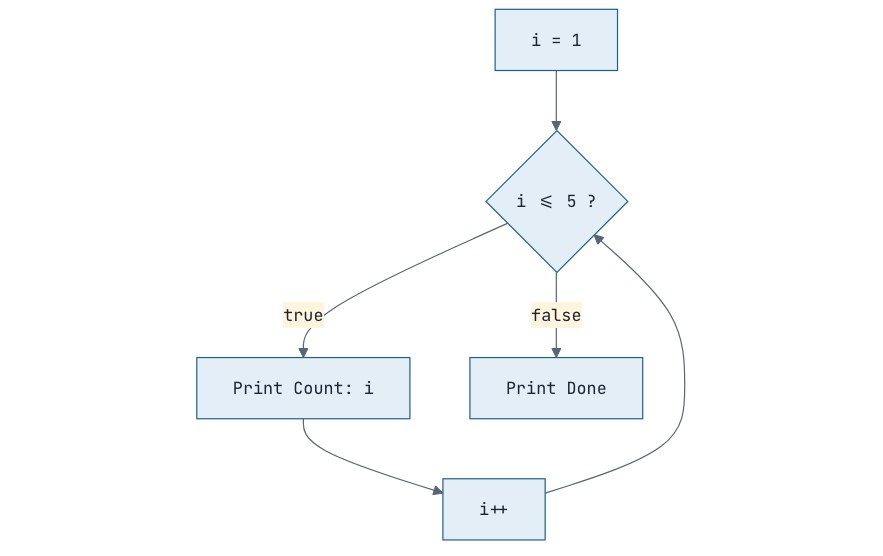
Every loop has three parts: a start value, a condition checked each round, and an update that moves towards the end. Forget the update and you get an infinite loop; stop it with the red ■ button in IntelliJ or Ctrl + C in a terminal.
3. Dry-running with a trace table
This is the single most useful skill for understanding loops. Take the program:
int sum = 0;int i = 1;while (i <= 4) { sum = sum + i; i++;}System.out.println(sum);|
Round |
i (at check) |
i <= 4? |
sum after |
i after |
|---|---|---|---|---|
|
1 |
1 |
true |
1 |
2 |
|
2 |
2 |
true |
3 |
3 |
|
3 |
3 |
true |
6 |
4 |
|
4 |
4 |
true |
10 |
5 |
|
5 |
5 |
false |
loop ends |
Output: 10.
4. The for loop
for puts all three parts on one line. Use it when you know how many times to repeat:
for (int i = 1; i <= 5; i++) { System.out.println("Count: " + i);}🗣️ Hinglish mein samjho
for (start; condition; update): ek hi line mein poori loop ki kahani. Pehle start ek baar chalta hai. Phir har round mein: condition check karo, true hai toh body chalao, phir update karo, phir wapas condition check. Condition false hui toh loop khatam. while aur for dono same kaam karte hain. for tab use karo jab pata ho kitni baar chalana hai (1 se 10 tak), while tab jab pata na ho (jab tak user "exit" na likhe).
Counting down or in steps:
for (int i = 10; i >= 1; i--) { System.out.print(i + " "); } // 10 9 8 ... 1for (int i = 0; i <= 20; i += 5) { System.out.print(i + " "); } // 0 5 10 15 20The variable i declared in the for only exists inside the loop.
5. The do-while loop
do-while runs the body first and checks afterwards, so it always runs at least once. It's perfect for menus:
import java.util.Scanner;public class Main { public static void main(String[] args) { Scanner sc = new Scanner(System.in); int choice; do { System.out.println("1. Say hello"); System.out.println("2. Say bye"); System.out.println("0. Exit"); System.out.print("Choose: "); choice = Integer.parseInt(sc.nextLine()); switch (choice) { case 1 -> System.out.println("Hello!"); case 2 -> System.out.println("Bye!"); case 0 -> System.out.println("Exiting..."); default -> System.out.println("Invalid choice"); } } while (choice != 0); }}|
Loop |
Checks condition |
Use when |
|---|---|---|
|
|
Before each round |
You know the number of repetitions |
|
|
Before each round |
You repeat until something happens |
|
|
After each round |
The body must run at least once (menus, input validation) |
6. break and continue
-
breakexits the loop immediately. -
continueskips the rest of this round and goes to the next round.
public class Main { public static void main(String[] args) { for (int i = 1; i <= 10; i++) { if (i == 7) break; // stop completely at 7 if (i % 2 == 0) continue; // skip even numbers System.out.print(i + " "); } }}Output: 1 3 5
7. Nested loops and patterns
A loop inside a loop: for each round of the outer loop, the inner loop runs completely.
Real-life analogy: A clock
The hour hand is the outer loop and the minute hand is the inner loop. For every one move of the hour hand, the minute hand goes all the way round.
Pattern printing is the classic way to practise this. The rule: outer loop = rows, inner loop = what goes in each row.
public class Main { public static void main(String[] args) { int n = 4; // Right triangle for (int row = 1; row <= n; row++) { for (int col = 1; col <= row; col++) { System.out.print("* "); } System.out.println(); } }}Output:
* * * * * * * * * * How to design any pattern: write a table of row number → how many of each thing that row has. For a centred pyramid with n = 4:
|
Row |
Spaces |
Stars |
|---|---|---|
|
1 |
3 |
1 |
|
2 |
2 |
3 |
|
3 |
1 |
5 |
|
4 |
0 |
7 |
Spaces = n - row, stars = 2 * row - 1. The code follows directly:
for (int row = 1; row <= n; row++) { for (int s = 1; s <= n - row; s++) System.out.print(" "); for (int st = 1; st <= 2 * row - 1; st++) System.out.print("*"); System.out.println();}Output:
* *** ************Common mistakes
-
Semicolon after the loop header:
for (int i = 0; i < 5; i++);runs an empty loop 5 times, then the body once. -
Off-by-one errors:
i < 5vsi <= 5. Always ask "what's the first value and what's the last?" -
Forgetting to update the variable in a
whileloop (infinite loop). -
Updating the wrong variable in nested loops (
i++in the inner loop instead ofj++).
Interview questions
What is the difference between while and do-while?
while checks the condition before each iteration, so the body may run zero times. do-while checks after, so the body runs at least once.
What is the difference between break and continue?
break terminates the loop entirely. continue skips the remaining statements of the current iteration and proceeds to the next iteration.
How do you exit from nested loops at once?
Use a labelled break: put a label like outer: before the outer loop and write break outer; inside the inner loop.
public class Main { public static void main(String[] args) { outer: for (int i = 1; i <= 5; i++) { for (int j = 1; j <= 5; j++) { if (i == 2 && j == 3) { break outer; } System.out.println("i = " + i + ", j = " + j); } } System.out.println("Loops ended!"); }}Practice
-
easy Print the multiplication table of a number read from the user (up to × 10).
-
easy Print the sum of all even numbers from 1 to N.
-
easy Print the factorial of N (5! = 120). Use
long, and find the largest N whose factorial fits. -
medium Count the digits of a number, and also print the sum of its digits (use
% 10and/ 10). -
medium Print an inverted right triangle, a number triangle (1 / 1 2 / 1 2 3) and Floyd's triangle (1 / 2 3 / 4 5 6).
Solution to Problem 1
import java.util.Scanner;public class Table { public static void main(String[] args) { Scanner sc = new Scanner(System.in); System.out.print("Table of: "); int n = Integer.parseInt(sc.nextLine()); for (int i = 1; i <= 10; i++) { System.out.printf("%d x %2d = %3d%n", n, i, n * i); } }}The widths in %2d and %3d keep the columns aligned when numbers grow from one to two or three digits.
Solution to Problem 2
import java.util.Scanner;public class EvenSum { public static void main(String[] args) { Scanner sc = new Scanner(System.in); System.out.print("N: "); int n = Integer.parseInt(sc.nextLine()); int sum = 0; for (int i = 2; i <= n; i += 2) { // jump straight from even to even sum += i; } System.out.println("Sum of even numbers up to " + n + " = " + sum); }}For N = 10: 2 + 4 + 6 + 8 + 10 = 30. Starting at 2 and stepping by 2 does half the work of checking i % 2 == 0 on every number. Both versions are correct; discuss why this one is faster.
Solution to Problem 3
import java.util.Scanner;public class Factorial { public static void main(String[] args) { Scanner sc = new Scanner(System.in); System.out.print("N: "); int n = Integer.parseInt(sc.nextLine()); long fact = 1; for (int i = 2; i <= n; i++) { fact *= i; } System.out.println(n + "! = " + fact); // Finding the largest N whose factorial fits in a long long f = 1; int k = 1; while (f <= Long.MAX_VALUE / (k + 1)) { // would multiplying by k+1 overflow? k++; f *= k; } System.out.println("Largest factorial that fits in a long: " + k + "! = " + f); }}The answer is 20. 21! is bigger than Long.MAX_VALUE, and it would silently overflow into a wrong (even negative) number, like the int overflow in Session 5. The check f <= Long.MAX_VALUE / (k + 1) tests "is there room?" before multiplying, which is the safe way to detect overflow.
Solution to problem 4
import java.util.Scanner;public class Main { public static void main(String[] args) { Scanner sc = new Scanner(System.in); System.out.print("Number: "); int n = Integer.parseInt(sc.nextLine()); n = Math.abs(n); int count = 0, sum = 0; do { sum += n % 10; // take the last digit n /= 10; // remove the last digit count++; } while (n > 0); System.out.println("Digits: " + count + ", sum: " + sum); }}do-while makes the number 0 count as 1 digit.
Solution to Problem 5
public class Triangles { public static void main(String[] args) { int n = 4; // Inverted right triangle for (int row = n; row >= 1; row--) { for (int col = 1; col <= row; col++) System.out.print("* "); System.out.println(); } // Number triangle for (int row = 1; row <= n; row++) { for (int col = 1; col <= row; col++) System.out.print(col + " "); System.out.println(); } // Floyd's triangle: the counter keeps growing across rows int number = 1; for (int row = 1; row <= n; row++) { for (int col = 1; col <= row; col++) { System.out.print(number + " "); number++; } System.out.println(); } }}Output:
* * * * * * * * * * 1 1 2 1 2 3 1 2 3 4 1 2 3 4 5 6 7 8 9 10 The key difference between the last two: in the number triangle each row prints col (which restarts at 1), while Floyd's triangle prints a separate counter declared outside both loops, so it never resets.

Discussion