1. What is a program?
A computer is extremely fast and extremely obedient, but it has no common sense. It does exactly what it is told, step by step. A program is a list of precise instructions that tells the computer what to do.
Real-life analogy: A recipe
A recipe says: boil water, add maggi, wait 2 minutes, add masala. A cook who follows those steps exactly gets the dish. A program is a recipe for the computer. If a step is missing or in the wrong order, the result is wrong, and the computer won't "figure out what you meant".
2. The language problem
Deep down, a computer's processor (CPU) only understands machine code: patterns of 0s and 1s. Writing programs in 0s and 1s is almost impossible for humans. So we write in high-level languages like Java, Python or C, which look closer to English, and a translator converts them to machine code.
There are two classic kinds of translator:
|
Compiler |
Interpreter |
|
|---|---|---|
|
How it works |
Translates the whole program first, then it runs |
Translates and runs one line at a time |
|
Analogy |
Translating a whole book before anyone reads it |
A live translator at a meeting, sentence by sentence |
|
Errors found |
Before running (many errors caught early) |
Only when that line is reached |
|
Examples |
C, C++ |
Python, JavaScript (traditionally) |
3. How Java does it: both
Java uses a clever two-step approach:
-
The Java compiler (
javac) translates your.javafile into bytecode, stored in a.classfile. Bytecode is not machine code for any real CPU. It is machine code for an imaginary computer. -
The JVM (Java Virtual Machine) is that imaginary computer, implemented as a program. It reads the bytecode and runs it on the real machine.
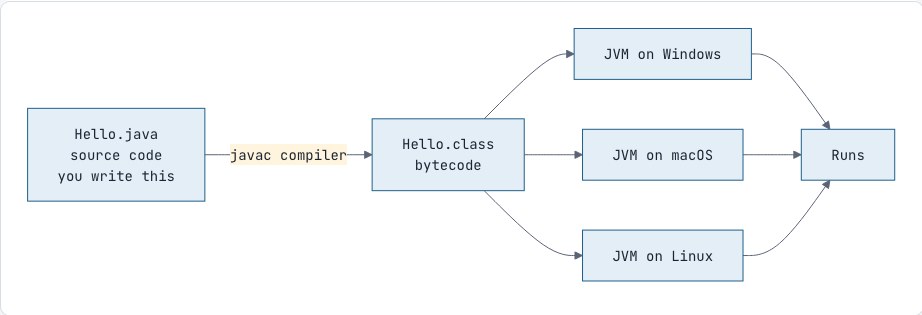
This is why Java's famous slogan is "Write Once, Run Anywhere" (WORA). You compile once, and the same .class file runs on Windows, Mac and Linux, because each of those systems has its own JVM that understands the same bytecode.
4. JDK, JRE and JVM
These three terms confuse every beginner, and they come up in almost every Java interview.
-
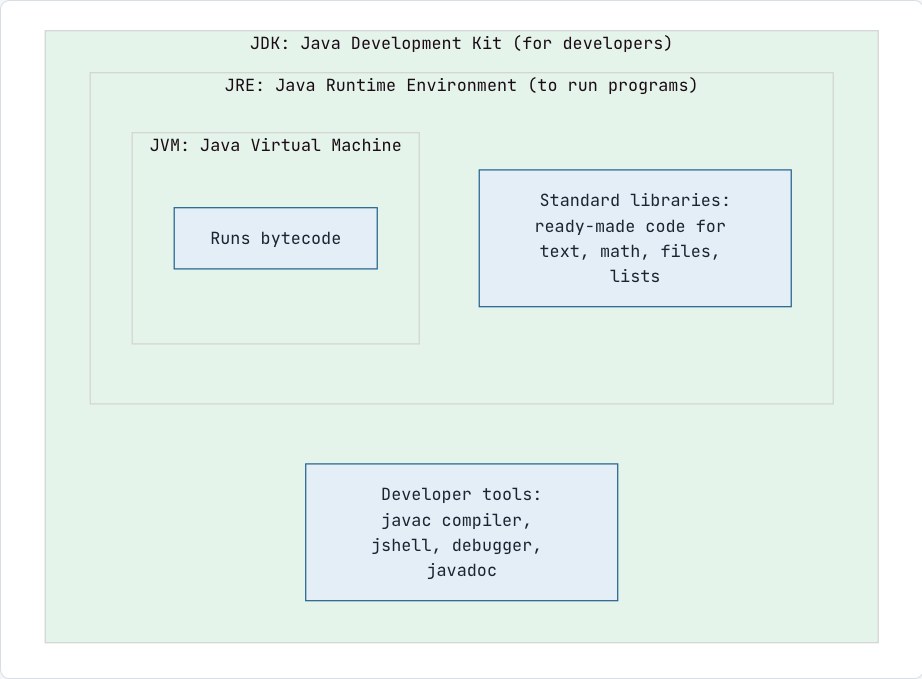
JVM: the engine that runs bytecode.
-
JRE: the JVM plus the standard libraries a program needs while running. It is enough to run Java programs.
-
JDK: the JRE plus developer tools such as the compiler. You need it to write and compile Java programs.
Real-life analogy: A car
The JVM is the engine. The JRE is the complete car you can drive. The JDK is the whole car factory, with tools to build new cars.
Note
Since Java 11, Oracle no longer ships a separate JRE download; you simply install the JDK. The JDK/JRE/JVM distinction still matters for understanding and for interviews.
5. A little context about Java
-
Created by James Gosling's team at Sun Microsystems and released in 1995. Oracle bought Sun in 2010.
-
A new Java version comes out every 6 months. Every 2 years, one version becomes an LTS (Long-Term Support) release that companies use for years: Java 8, 11, 17, 21 and 25. We use Java 21, which is what most companies run in production today, and everything you learn here works unchanged on newer versions.
-
Where Java is used: banking and payment systems, large company backends (often with Spring Boot), Android apps, big-data tools such as Hadoop and Kafka, and much more.
6. Setting up
-
Install JDK 21. A good free option is Eclipse Temurin 21 from adoptium.net. Choose your operating system and download the installer (on Windows, tick "Set JAVA_HOME" and "Add to PATH" during installation).
-
Open a terminal (Command Prompt on Windows) and check the installation:
java -versionjavac -versionYou should see 21.x.x in both. If you see "command not found" or "not recognized", the JDK is not on your PATH; reinstall and tick the PATH option.
-
Install IntelliJ IDEA Community Edition. Create a new project: New Project → Java → choose JDK 21 as the SDK → untick "Add sample code" → Create.
7. Your first program
In IntelliJ, right-click the src folder → New → Java Class → type Hello. Type this (don't paste):
public class Hello { public static void main(String[] args) { System.out.println("Hello, World!"); }}Click the green ▶ next to public static void main and choose Run.
Output
Hello, World!That's a complete Java program. Now let's look at it honestly.
The frame and the picture
Think of the program as a photo frame with a picture inside it:
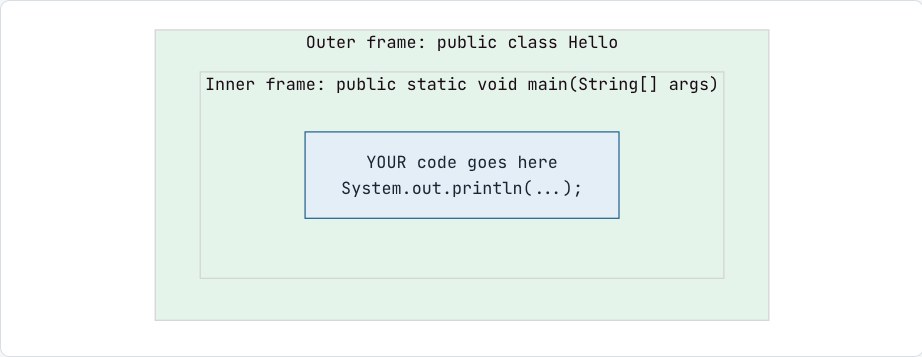
For the next several sessions every program has the same frame, and all the thinking happens inside the inner braces. Today we explain what we can:
-
System.out.println("Hello, World!");prints the text inside the quotes and then moves to a new line. -
The text inside double quotes
"..."is printed exactly as written. -
The semicolon
;ends an instruction, like a full stop ends a sentence. -
Curly braces
{ }group things. The inner pair holds the instructions ofmain; the outer pair holds everything that belongs to the classHello. Every{needs a matching}, and IntelliJ highlights the partner when you click next to one. -
Java is case-sensitive:
Systemworks, butsystemorSYSTEMdo not. -
The file name must match the class name:
public class Hellomust be saved inHello.java.
And the words in the frame? Here is the honest deal with the candidate:
Promise: We will open this box properly later
The frame,
public class Helloandpublic static void main(String[] args): for now, "this is the fixed shape every Java program lives in." Nothing in it is magic, and none of it will be left unexplained. Each word gets its full meaning at the right time:mainandvoidin Session 9,String[] argsin Sessions 11–12,classin Session 14,publicin Session 16, andstaticin Session 17, where we read the whole line together, word by word.
Promise: We will open this box properly later
main: for now, "the program starts running here." When you run the program, Java looks formainand runs the lines inside its braces from top to bottom.void: for now, "this part does its job and gives no answer back." Both become precise in Session 9, when we write our own methods.
Promise: We will open this box properly later
System.out.println: for now, "the command that prints something to the screen and moves to the next line." Why it's written with two dots, and whatSystemandoutactually are, becomes clear in Session 17.
8. Running from the terminal: seeing both steps
IntelliJ hides the two steps from section 3. The terminal shows them. Open a terminal in the folder containing Hello.java:
javac Hello.javajava HelloOutput
Hello, World!-
javac Hello.javacompiles: it creates a new file,Hello.class, containing bytecode. List the folder (diron Windows,lson Mac/Linux) to see it. -
java Hellostarts the JVM, which loadsHello.classand runsmain. Note: no.classat the end.
Try opening Hello.class in a text editor: it's unreadable binary. That's bytecode, meant for the JVM, not for humans.
Note: A shortcut
Since Java 11 you can also run java Hello.java in one step: Java compiles in memory and runs immediately, without leaving a .class file. It's handy for quick experiments, but show the two-step version first so the candidate sees compilation happen.
Promise: We will open this box properly later
The JVM does much more than run bytecode: it manages memory, cleans up unused data (garbage collection) and even speeds up frequently-run code while the program is running. For now, "the JVM is the virtual computer that runs bytecode" is enough. We'll look inside it in Session 37.
9. Your first error (on purpose)
Remove the semicolon and run again:
public class Hello { public static void main(String[] args) { System.out.println("Hello, World!") }}Output
Hello.java:3: error: ';' expected System.out.println("Hello, World!") ^1 errorHow to read an error message: Hello.java:3 means file name and line number. Then comes the problem (';' expected), and the ^ points at the exact spot. This is a compile-time error: the compiler refused to translate the code, so nothing ran.
Common mistakes
-
Writing
system.out.printlnorSystem.out.PrintLn: Java is case-sensitive. -
Saving
public class Helloin a file calledhello.javaorProgram.java: the compiler says "class Hello is public, should be declared in a file named Hello.java". -
Forgetting the closing quote or closing brace.
-
Copying code from a PDF or WhatsApp, which turns
"into curly quotes (“ ”). Java only accepts straight quotes. -
Saving the file as
Hello.java.txton Windows (turn on "show file extensions").
Interview questions
What is the difference between JDK, JRE and JVM?
The JVM runs bytecode. The JRE is the JVM plus the standard libraries needed to run programs. The JDK is the JRE plus development tools such as the compiler (javac). To run Java you need a JRE; to develop it you need the JDK.
Why is Java called platform independent? Is the JVM platform independent?
Java source code compiles to bytecode, which is the same on every platform, and any machine with a JVM can run it. The JVM itself is platform dependent: each operating system has its own JVM implementation.
Is Java compiled or interpreted?
Both. javac compiles source code to bytecode; the JVM then interprets that bytecode and also compiles frequently-used parts to native machine code at runtime using the JIT (Just-In-Time) compiler.
What is bytecode?
An intermediate, platform-neutral instruction set stored in .class files. It is the "machine language" of the JVM.
Practice
-
easy Print your name, your city and your favourite food on three separate lines.
-
easy Print this box using several
System.out.printlncalls:
+--------+| JAVA |+--------+-
easy Introduce each of these errors one at a time, run, and write down the error message and line number: missing semicolon, missing closing brace,
printlnmisspelt asprintn, missing closing quote, and the class renamed toHiwhile the file is stillHello.java. -
medium In the terminal, run
javac Hello.javaand then list the folder. What new file appeared? Now runjava Hello. Explain in two sentences what each command did. What happens if you then deleteHello.javaand runjava Helloagain? And if you deleteHello.classinstead?

Discussion