1. Widening: automatic and safe
Putting a value from a smaller box into a bigger box is always safe, so Java does it automatically. This is called widening (or implicit conversion).
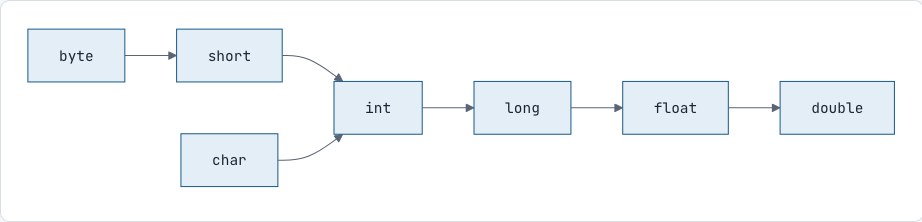
public class Main { public static void main(String[] args) { int marks = 85; double d = marks; // int → double automatically long big = marks; // int → long automatically System.out.println(d); // 85.0 }}2. Narrowing: explicit casting
Going from a bigger box to a smaller one can lose data, so Java refuses unless you say "I know what I'm doing" with a cast: the target type in brackets.
public class Main { public static void main(String[] args) { double price = 99.99; // int p = price; // error: possible lossy conversion int p = (int) price; // cast: decimal part is cut off System.out.println(p); // 99 (not 100! Casting truncates, it doesn't round) int big = 130; byte b = (byte) big; // 130 doesn't fit in a byte (max 127) System.out.println(b); // -126 (it wraps around) }}Integer overflow happens without casting too
int max = 2147483647; // the largest intSystem.out.println(max + 1); // -2147483648 (wraps around, no error!)Java gives no warning for this. It's a real source of bugs, like a bank total that suddenly goes negative. If values can get large, use long.
3. Fixing the average problem from Session 4
public class Main { public static void main(String[] args) { int total = 250, count = 3; double wrong = total / count; // 83.0: int division happens first double right = (double) total / count; // 83.333...: total becomes double first double alsoWrong = (double) (total / count); // 83.0: division already done in int System.out.println(wrong + " " + right + " " + alsoWrong); }}The cast applies to what comes immediately after it. In right, only total is cast, and then double ÷ int gives a double.
4. Type promotion inside expressions
In arithmetic, Java promotes byte, short and char to int first. This surprises people:
byte a = 10, b = 20;// byte c = a + b; // error: a + b is an intbyte c = (byte) (a + b); // OK with a casta += 5; // OK: compound assignment includes a hidden cast5. char and int are close friends
Every character has a number code (its Unicode value). 'A' is 65, 'B' is 66, 'a' is 97, '0' is 48.
public class Main { public static void main(String[] args) { char c = 'A'; int code = c; // 65 char next = (char) (c + 1); // 'B' char lower = (char) (c + 32); // 'a' (lowercase is 32 more than uppercase) int digit = '7' - '0'; // 7: turns a digit character into its number value System.out.println(code + " " + next + " " + lower + " " + digit); }}Output
65 B a 7The '7' - '0' trick is used all the time when processing digits in text.
6. Ready-made tools: Math
Java comes with thousands of ready-made tools. The Math tools are the first ones we'll use:
|
Tool |
Does |
Example |
Result |
|---|---|---|---|
|
|
Larger of two |
|
9 |
|
|
Smaller of two |
|
4 |
|
|
Distance from zero |
|
7 |
|
|
a to the power b |
|
1024.0 |
|
|
Square root |
|
7.0 |
|
|
Nearest whole number |
|
5 |
|
|
Round down / up |
|
5.0 |
|
|
Random decimal from 0.0 up to (not including) 1.0 |
e.g. 0.7312... |
public class Main { public static void main(String[] args) { // A dice roll: a random whole number from 1 to 6 int dice = (int) (Math.random() * 6) + 1; System.out.println("You rolled " + dice); // Rounding to 2 decimal places double amount = 1234.5678; System.out.println(Math.round(amount * 100) / 100.0); // 1234.57 }}We will open this box properly later
Math.max(...), Math.round(...): for now, "ready-made tools that we use by writing ClassName.toolName(...)." These tools are called static methods. Why they're called with a class name and a dot, and how to write our own, becomes clear in Session 17.
7. Neat output with printf
printf ("print formatted") lets you control exactly how values appear. You write a template with placeholders, then give the values:
public class Main { public static void main(String[] args) { String item = "Paneer Tikka"; int qty = 2; double price = 249.5; System.out.printf("%s x %d = %.2f%n", item, qty, qty * price); System.out.printf("|%-15s|%5d|%10.2f|%n", item, qty, price); }}Output
Paneer Tikka x 2 = 499.00|Paneer Tikka | 2| 249.50||
Placeholder |
For |
Notes |
|---|---|---|
|
|
Whole numbers |
|
|
|
Decimals |
|
|
|
Text |
|
|
|
A single char |
|
|
|
A boolean |
|
|
|
New line |
Use instead of |
String.format(...) works the same way but gives you the text instead of printing it.
Common mistakes
-
Expecting
(int) 4.9to be 5. Casting truncates; useMath.roundto round. -
Writing
(double) (a / b)and expecting a decimal: the division already happened in int. -
Forgetting that
Math.powandMath.sqrtreturndouble:int x = Math.pow(2, 3);is an error without a cast. -
Mixing up placeholder order:
printf("%d %s", "Riya", 5)crashes with a format error.
Interview questions
What is the difference between implicit and explicit type casting?
Implicit (widening) conversion happens automatically from a smaller to a larger type, with no data loss. Explicit (narrowing) casting must be written by the programmer, e.g. (int) 3.7, because it can lose data.
What does (int) 'A' return?
65, the Unicode code of the character A.
What happens when an int overflows?
It silently wraps around. Integer.MAX_VALUE + 1 becomes Integer.MIN_VALUE (-2147483648). No exception is thrown.
Practice
-
easy Convert a temperature of 98.6 °F to Celsius using
C = (F - 32) * 5 / 9and print it with 1 decimal place. -
easy Given
int a = 17, b = 5;, print the exact decimal result of a ÷ b. -
easy Print the character that comes 3 places after
'x'in the alphabet... then think about what goes wrong, and why. -
medium Compound interest:
A = P * (1 + R/100)^T. With P = 100000, R = 8, T = 5, print the amount with 2 decimals. -
medium Simulate rolling two dice and print both values and their total.
-
medium Print a formatted table of 3 products with columns aligned (name left-aligned, price right-aligned with 2 decimals).
Problem 1
public class FeverCheck { public static void main(String[] args) { double f = 98.6; double c = (f - 32) * 5 / 9; System.out.printf("%.1f °F = %.1f °C%n", f, c); }}Output
98.6 °F = 37.0 °Cf is a double, so (f - 32) * 5 / 9 stays in decimals all the way. A classic bug is writing 5 / 9 * (f - 32): 5 / 9 is integer division, which gives 0, so the answer is always 0.0. Order and types both matter.
Problem 2
public class ExactDivision { public static void main(String[] args) { int a = 17, b = 5; System.out.println(a / b); // 3 (integer division) System.out.println((double) a / b); // 3.4 (a becomes 17.0 first) System.out.println(a % b); // 2 (remainder, for comparison) }}The cast must apply to an operand before the division happens. (double) (a / b) would give 3.0, because the division already happened in int.
Problem 3
char c = 'x';System.out.println((char) (c + 3)); // '{''x' + 3 goes past 'z' into the next Unicode characters, so it prints {. To wrap around to 'a' you'd need % and some arithmetic. Try: (char) ('a' + (c - 'a' + 3) % 26).
Problem 4
double p = 100000, r = 8;int t = 5;double amount = p * Math.pow(1 + r / 100, t);System.out.printf("Amount: %.2f%n", amount); // Amount: 146932.81Problem 5
public class TwoDice { public static void main(String[] args) { int die1 = (int) (Math.random() * 6) + 1; int die2 = (int) (Math.random() * 6) + 1; System.out.println("Die 1: " + die1); System.out.println("Die 2: " + die2); System.out.println("Total: " + (die1 + die2)); }}How the formula works, step by step:
|
Step |
Range of values |
|---|---|
|
|
0.0 up to 0.999... |
|
|
0.0 up to 5.999... |
|
|
0, 1, 2, 3, 4 or 5 |
|
|
1 to 6 |
General recipe for a random whole number from min to max: (int) (Math.random() * (max - min + 1)) + min.
Problem 6
public class PriceTable { public static void main(String[] args) { System.out.printf("%-20s%10s%n", "Product", "Price"); System.out.printf("%-20s%10.2f%n", "Notebook", 45.0); System.out.printf("%-20s%10.2f%n", "Wireless mouse", 799.5); System.out.printf("%-20s%10.2f%n", "USB-C cable", 249.99); }}Output
Product PriceNotebook 45.00Wireless mouse 799.50USB-C cable 249.99%-20s pads the name to 20 characters and keeps it on the left (the minus sign means left-align). %10.2f makes the price 10 characters wide, right-aligned, with exactly 2 decimals, so the decimal points line up. Compare this with the tab-based bill from Session 2.

Discussion