🎯 By the end of this session, the candidate can
Read text from the keyboard.
Convert text input into numbers.
Structure a program as input → process → output.
Read a crash message and find the problem line.
1. Programs that listen
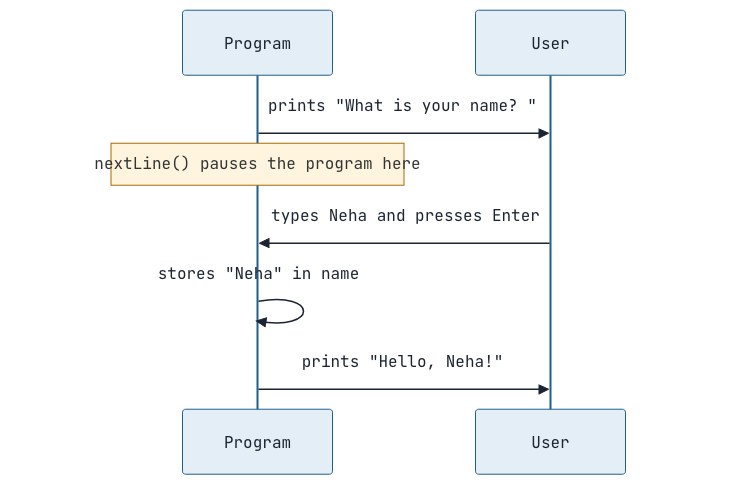
So far, every value was written inside the code. Real programs ask the user. In Java, the standard tool for reading the keyboard is called Scanner. Here is the complete pattern; type it exactly, then we'll go through it line by line:
import java.util.Scanner;public class Greet { public static void main(String[] args) { Scanner sc = new Scanner(System.in); System.out.print("What is your name? "); String name = sc.nextLine(); System.out.println("Hello, " + name + "!"); }}Output
What is your name? RohitHello, Rohit!What each new line does:
|
Line |
What it means today |
|---|---|
|
|
"The Scanner tool lives in Java's |
|
|
"Create a keyboard reader and call it |
|
|
The prompt. We use |
|
|
Wait until the user types something and presses Enter, then store everything they typed as a |
Promise: we will open this box properly later
Scanner sc = new Scanner(System.in);: for now, "create a keyboard reader named sc." The wordnewcreates an object, andScanneris a class. Both ideas arrive in Session 14, and then this line will make complete sense. We'll also meet Scanner's other methods (nextInt,nextDouble) there, together with a famous trap they cause.
Promise: we will open this box properly later
import java.util.Scanner;: for now, "tell Java which toolbox the Scanner tool comes from." Why doesScannerneed an import whileSystemandMathnever do? Session 16 (packages) answers that.
2. Turning text into numbers
nextLine() always gives text. The text "25" is not the number 25, and you can't do maths with it:
import java.util.Scanner;public class AddTwo { public static void main(String[] args) { Scanner sc = new Scanner(System.in); System.out.print("First number: "); String a = sc.nextLine(); System.out.print("Second number: "); String b = sc.nextLine(); System.out.println(a + b); // "10" + "20" = 1020 (text joining!) int x = Integer.parseInt(a); // convert text to int int y = Integer.parseInt(b); System.out.println(x + y); // 30 }}Output
First number: 10Second number: 20102030|
To get |
Use |
|---|---|
|
int |
Integer.parseInt(text) |
|
long |
Long.parseLong(text) |
|
double |
Double.parseDouble(text) |
|
boolean |
Boolean.parseBoolean(text) |
A shorter style reads and converts in one line. This is the pattern we’ll use for every number from now on:
System.out.print("Your age: ");int age = Integer.parseInt(sc.nextLine());Integer.parseInt follows the same ClassName.tool(...) pattern as Math.max, so it's covered by promise. We'll learn what Integer itself is (a wrapper class) in Session 23.
📝 Note: Why not sc.nextInt()?
Scanner also has
nextInt()andnextDouble(), and you'll see them in many tutorials. Mixing them withnextLine()causes a confusing bug where an input is "skipped". Reading every line withnextLine()and converting withparseIntavoids that bug completely. We'll study the trap properly in Session 14.
3. Input → Process → Output
Almost every program follows this shape. Planning it this way before coding makes problems much easier.

import java.util.Scanner;public class Main { public static void main(String[] args) { Scanner sc = new Scanner(System.in); // INPUT System.out.print("Total bill: "); double bill = Double.parseDouble(sc.nextLine()); System.out.print("Number of people: "); int people = Integer.parseInt(sc.nextLine()); System.out.print("Tip %: "); int tipPercent = Integer.parseInt(sc.nextLine()); // PROCESS double tip = bill * tipPercent / 100; double perPerson = (bill + tip) / people; // OUTPUT System.out.printf("Tip: %.2f%n", tip); System.out.pritf("Each person pays: %.2f%n", perPerson); }}4. When the user types something wrong
Run the age program and type twenty instead of a number:
Output
Your age: twentyException in thread "main" java.lang.NumberFormatException: For input string: "twenty" at java.base/java.lang.NumberFormatException.forInputString(NumberFormatException.java:67) at java.base/java.lang.Integer.parseInt(Integer.java:661) at java.base/java.lang.Integer.parseInt(Integer.java:777) at Age.main(Age.java:8)This is a runtime error: the code compiled fine, but crashed while running. The red text looks scary, but reading it is simple:
-
First line: what went wrong:
NumberFormatException: For input string: "twenty". The text couldn't be turned into a number. -
Find the line with your file name:
Age.java:8. That's where your code triggered it. Ignore thejava.baselines; they're inside Java's own code.
Promise: We will open this box properly later
The crash message: for now, “the program crashed; read the first line and find your file name.“ In session 26 we’ll learn exception handling: how to catch these problems and response politely (“Please enter a number“) instead of crashing.
Interview Questions
What is the difference between compile-time error and a runtime error ?
A compile-time error is detected by the compiler before the program runs (e.g. syntax errors, type mismatches), so no bytecode is produced. A runtime error occurs while the program is running (e.g. dividing by zero, invalid number format) and usually causes an exception.
What does Integer.parseInt("12a") do?
It throws a NumberFormatException because "12a" is not a valid integer.
Practice
-
easy Ask for a name and birth year and print "Hi Neha, you are about 24 years old" (use 2026 as the current year).
-
easy Ask for the length and width of a room in feet and print the area in square feet and square metres (1 sq ft = 0.0929 sq m).
-
easy Ask for marks in 5 subjects and print the total and the percentage with 2 decimals.
-
medium Ask for a number of days and print it as years, weeks and days (ignore leap years).
Solution to problem 4
import java.util.Scanner;public class DaysBreakdown { public static void main(String[] args) { Scanner sc = new Scanner(System.in); System.out.print("Number of days: "); int totalDays = Integer.parseInt(sc.nextLine()); int years = totalDays / 365; int plusDays = totalDays % 365; int weeks = plusDays / 7; int days = plusDays % 7; System.out.println(years + " years, " + weeks + " weeks, " + days + " days"); }}Output
Number of days: 10002 years, 38 weeks, 4 daysCheck: 2 × 365 = 730; 1000 − 730 = 270; 270 = 38 × 7 + 4. The pattern "divide to get the big unit, remainder for what's left" is the same one used for seconds → hours in Session 4.

Discussion