Recap question: What does Integer.parseInt do, and what happens if the text isn't a number?
1. The if statement
Until now every line ran everytime. if runs a block only when the condition is true:
import java.util.Scanner;public class Main { public static void main(String[] args) { Scanner sc = new Scanner(System.in); System.out.print("Age: "); int age = sc.nextInt(); if (age >= 18) { System.out.println("You can vote."); } System.out.println("Thank you!"); // always runs }}The condition inside ( ) must be a boolean: something that is true or false.
2. if / else
package sessionSeven;import java.util.Scanner;public class IfElse { public static void main(String[] args) { Scanner sc = new Scanner(System.in); int age = sc.nextInt(); System.out.println("Your age is : " + age); if (age >= 18) { System.out.println("You can vote"); } else { System.out.println("Wait " + (18 - age) + " more years"); } System.out.println("Thank you"); }}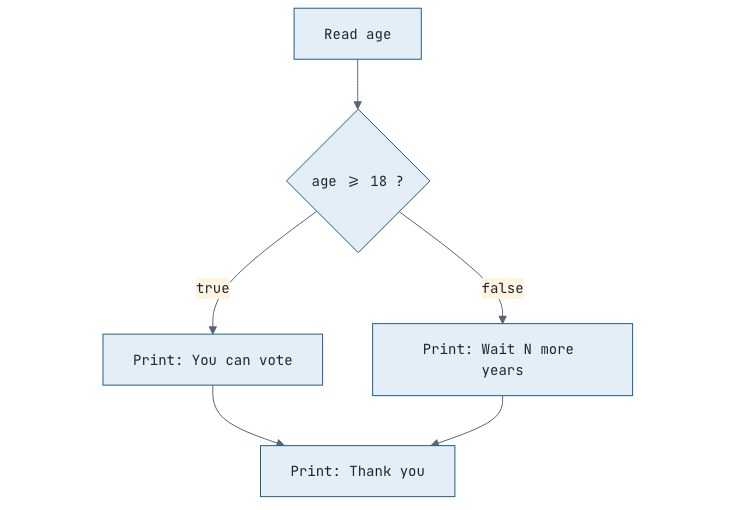
3. The else if ladder
When there are more than two paths:
import java.util.Scanner;public class Main { public static void main(String[] args) { Scanner sc = new Scanner(System.in); System.out.print("Marks (0-100): "); int marks = Integer.parseInt(sc.nextLine()); char grade; if (marks >= 90) { grade = 'A'; } else if (marks >= 75) { grade = 'B'; } else if (marks >= 60) { grade = 'C'; } else if (marks >= 40) { grade = 'D'; } else { grade = 'F'; } System.out.println("Grade: " + grade); }}Java checks conditions from top to bottom and runs only the first true branch. That's why marks >= 75 doesn't need && marks < 90: if marks were 90 or more, the first branch would already have run.
4. Nested ifs and blocks
An if can sit inside another:
if (age >= 18) { if (hasLicence) { System.out.println("You can drive."); } else { System.out.println("Get a licence first."); }} else { System.out.println("Too young to drive.");}Often && makes this flatter: if (age >= 18 && hasLicence).
Always use braces, even for one line. Without braces only the next single statement belongs to the if, a classic source of bugs.
A variable declared inside a block { } only exists inside that block. This is called its scope:
if (age >= 18) { String msg = "Adult";}// System.out.println(msg); // error: msg doesn't exist here5. Comparing text: .equals()
import java.util.Scanner;public class Main { public static void main(String[] args) { Scanner sc = new Scanner(System.in); System.out.print("Capital of India? "); String answer = sc.nextLine(); if (answer.equals("New Delhi")) { System.out.println("Correct!"); } if (answer.equalsIgnoreCase("new delhi")) { System.out.println("Correct (ignoring capital letters)!"); } }}Promise: we will open this box properly later
For text, always use
.equals(), never==. With text typed by a user,==usually givesfalseeven when the words are identical, because==checks something different for text. We'll see what it checks in Session 12 (String pool) and the full story in Session 22.
6. The ternary operator
A compact if/else that produces a value:
int a = 7, b = 12;int bigger = (a > b) ? a : b; // condition ? valueIfTrue : valueIfFalseString type = (a % 2 == 0) ? "even" : "odd";Use it for simple choices only. Nested ternaries are hard to read.
7. switch
When you compare one value against many fixed options, switch is cleaner than a long ladder.
Modern arrow switch (use this)
import java.util.Scanner;public class Main { public static void main(String[] args) { Scanner sc = new Scanner(System.in); System.out.print("Day number (1-7): "); int day = Integer.parseInt(sc.nextLine()); String name = switch (day) { case 1 -> "Monday"; case 2 -> "Tuesday"; case 3 -> "Wednesday"; case 4 -> "Thursday"; case 5 -> "Friday"; case 6, 7 -> "Weekend!"; default -> "Invalid day"; }; System.out.println(name); }}This is a switch expression: it produces a value that we store in name. It also works on String and char values.
Classic switch (you'll see it in older code)
switch (day) { case 1: System.out.println("Monday"); break; case 2: System.out.println("Tuesday"); break; default: System.out.println("Other day");}In the classic form, forgetting break causes fall-through: execution continues into the next case. With day = 1 and no breaks, it would print Monday, Tuesday and Other day. The arrow form never falls through, which is why it's preferred.
⚠️ Common mistakes
Putting a semicolon after the condition:
if (x > 5);ends the if right there. The block below then always runs.Wrong ladder order: checking
>= 40before>= 90.
if (name == "Riya"): use.equals.Forgetting
breakin a classic switch.Using
=instead of==in a condition.
Interview questions
What is fall-through in a switch statement?
In a classic switch with : labels, execution continues into the following cases until a break is reached. Arrow-style cases (->) never fall through.
Which types can be used in a switch?
int and smaller integer types (byte, short, char), their wrapper classes, String and enums. Modern Java also supports pattern matching on objects in switch.
What is the difference between a switch statement and a switch expression?
A switch expression produces a value (e.g. String s = switch (x) { ... };) and must cover all cases, usually with default. A switch statement just executes code.
Practice
-
easy Read a number and print whether it is positive, negative or zero.
-
easy Read a number and print whether it is even or odd, using the ternary operator.
-
easy Read three numbers and print the largest.
-
medium Read three sides of a triangle. Print whether they can form a triangle (each side less than the sum of the other two), and if so, whether it is equilateral, isosceles or scalene.
-
medium Electricity bill: first 100 units at ₹5, next 100 at ₹7, anything above 200 at ₹10. Read units and print the bill.

Discussion