1. Why Methods?
Imagine printing a line of 30 dashes in 10 different places. Copying the same loop 10 times is tiring, and if you later want 40 dashes, you must change 10 places. A method is a named, reusable block of code. You write it once and call it by name whenever you need it.
Real-life analogy: A mixer-grinder
You put things in (ingredients), it does its job, and something comes out (chutney). You don't need to know how the motor works each time; you just press the button. A method takes inputs (parameters), does its job, and can give back an output (return value).
2. Your first methods
Methods live inside the class, next to main (not inside main):
public class Main { public static void main(String[] args) { printLine(); System.out.println("Report Card"); printLine(); } static void printLine() { System.out.println("------------------------------"); }}Output
------------------------------Report Card------------------------------printLine() defines the method; printLine(); inside main calls it. When the call happens, Java jumps into the method, runs it, and comes back to the next line of main.
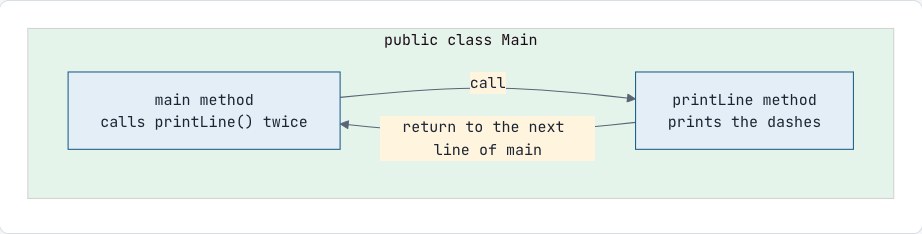
Promise: We will open this box properly later
staticin front of our methods: notice thatprintLinestarts withstatic, just likemain. For now, the rule is simple: "every method we write before Session 17 starts withstatic, the same asmain." Leave it out and Java says "non-static method cannot be referenced from a static context". Session 17 explains exactly whatstaticmeans and why that error happens.
3. Parameters: giving a method input
public class Main { public static void main(String[] args) { printLine('-', 20); printLine('*', 10); } static void printLine(char symbol, int length) { for (int i = 0; i < length; i++) { System.out.print(symbol); } System.out.println(); }}-
Parameters are the variables in the method definition:
char symbol, int length. -
Arguments are the actual values passed when calling:
'-', 20.
Arguments are matched to parameters by position, and the types must match.
4. Return values: getting an answer back
public class Main { public static void main(String[] args) { int s = square(7); System.out.println(s); // 49 System.out.println(square(3) + 1); // 10 if (isEven(10)) { System.out.println("10 is even"); } } static int square(int n) { return n * n; } static boolean isEven(int n) { return n % 2 == 0; }}The return type before the name (int, boolean) says what kind of value comes back. return sends the value back and ends the method immediately.
Anatomy of a method
return type name parameters | | | int square (int n) { return n * n; ← body }Promise kept
In Session 1 we said main means "the program starts here" and void means "gives no answer back." Now we can be precise:
-
mainis a method, exactly likesquareandprintLine. It's special only because the JVM calls it when you run the program, so it's the starting point. -
voidmeans the method returns nothing. It does its job and gives no value back.printLineisvoidtoo;squareis not, because it returns anint. -
(String[] args)is main's parameter list, just like(int n)insquare. It holds text values given when the program starts; we'll see whatString[]means in Session 11 and useargsin Session 17.
5. What happens during a call: the call stack
Java keeps track of method calls using the call stack. Each call gets its own frame (a workspace holding that method's variables). When a method returns, its frame is removed.
public class Main { public static void main(String[] args) { int result = addTwice(3, 4); System.out.println(result); } static int addTwice(int a, int b) { int s = add(a, b); return s * 2; } static int add(int x, int y) { return x + y; }}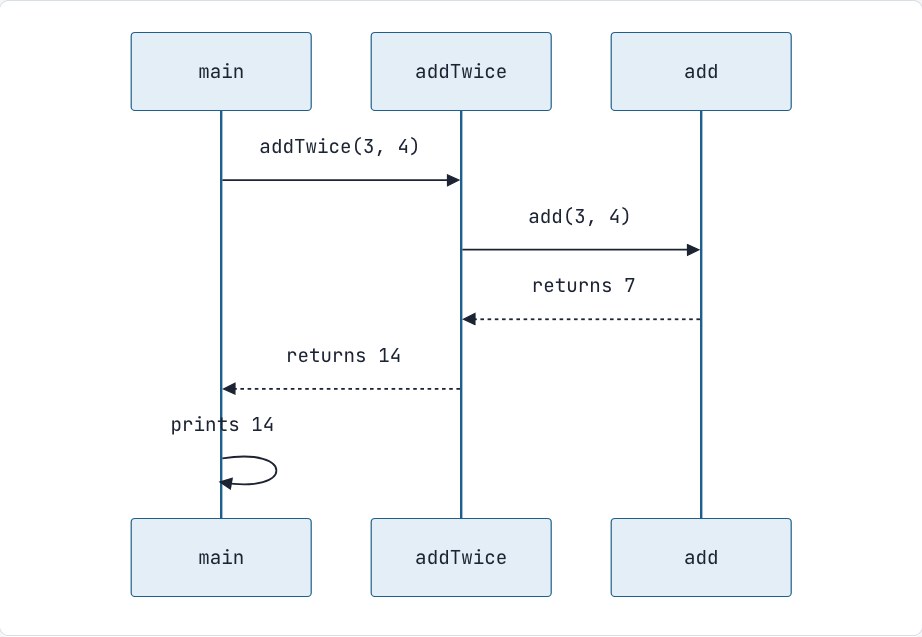
Real-life analogy: A stack of plates
The newest plate goes on top and is the first one taken off. The method currently running is always the top plate.
To get a changed value back, return it: count = doubleIt(count); with int doubleIt(int n) { return n * 2; }.
6. Scope: each method has its own variables
Variables declared in a method (including parameters) are local: they exist only while that method runs and can't be seen from other methods.
public class Main { public static void main(String[] args) { int count = 5; doubleIt(count); System.out.println(count); // still 5! } static void doubleIt(int count) { count = count * 2; // changes only the local copy System.out.println("Inside: " + count); // 10 }}To get a changed value back, return it: count = doubleIt(count); with int doubleIt(int n) { return n * 2; }.
7. Method overloading
Several methods can share a name if their parameter lists differ (in number, type or order):
public class Main { public static void main(String[] args) { System.out.println(area(5)); // square: 25 System.out.println(area(4, 6)); // rectangle: 24 System.out.println(area(2.0)); // circle: 12.566... } static int area(int side) { return side * side; } static int area(int length, int width) { return length * width; } static double area(double radius) { return Math.PI * radius * radius; }}Java picks the right version from the arguments. You've been using overloading all along: System.out.println has versions for int, double, String, char, boolean and more.
The return type alone is not enough to overload: int f(int x) and double f(int x) together are an error.
8. Writing good methods
-
One method, one job.
isPrimechecks primality; it doesn't also print a menu. -
Name methods with verbs, in camelCase:
calculateTotal,printReport,isValid. -
Prefer returning values over printing inside the method. A method that returns can be reused anywhere; a method that prints can only print.
-
Document methods with a Javadoc comment:
/** * Returns true if n is a prime number. * @param n the number to check (any int) * @return true when n is prime, otherwise false */static boolean isPrime(int n) { if (n < 2) return false; for (int i = 2; i * i <= n; i++) { if (n % i == 0) return false; } return true;}Common mistakes
-
Forgetting
staticon your own method, which gives "non-static method cannot be referenced from a static context" (promise P14). -
Declaring a method inside
main. Methods go side by side inside the class, never inside another method. -
Calling a method with the wrong number or types of arguments.
-
Forgetting
returnin a non-void method: "missing return statement". Every path must return a value. -
Writing code after
returnin the same block: "unreachable statement". -
Calling a method and ignoring its result:
square(5);on its own line computes 25 and throws it away. -
Expecting a method to change the caller's primitive variable.
Interview questions
What is the difference between parameters and arguments?
Parameters are the variables listed in a method's declaration. Arguments are the actual values passed when the method is called.
Is Java pass-by-value or pass-by-reference?
Always pass-by-value. For primitives, the value itself is copied. For objects and arrays, the value of the reference is copied, so both caller and method refer to the same object (we'll see this in Session 11).
What is method overloading? Can we overload by changing only the return type?
Defining multiple methods with the same name but different parameter lists in the same class. No, changing only the return type is not allowed, because the compiler couldn't tell which one a call means.
What is the call stack?
A stack of frames maintained per thread. Each method call pushes a frame holding its parameters and local variables; returning pops the frame.
Practice
-
easy Write
int max(int a, int b)and use it to find the maximum of four numbers. -
easy Write
double celsiusToFahrenheit(double c)and print a conversion table from 0 °C to 100 °C in steps of 10. -
easy Write
boolean isVowel(char c)that handles both upper- and lowercase. -
medium Write
int countDigits(int n)andint sumDigits(int n)and use them in main on user input. -
medium Write overloaded
addmethods for two ints, three ints and two doubles. -
medium Write
boolean isPrime(int n)(see above) and use it to print all primes from 1 to 100.
Discussion