I don't usually write about my own code. But last week I reread one specific piece of Revquix's backend - the real-time notification system - the way I'd review a stranger's pull request. No memory of writing it, no assumptions, just: does this actually hold up under the questions a demo never asks?
Quick context if you're new here: Revquix is a personal project, I build it to actually learn backend engineering and system design by working through problems that only show up once you build something with real, production-shaped constraints - not another tutorial CRUD app. This piece - the real-time notification system - held up better than I expected, with one honest exception I'll get to. Here's the whole thing, in order.

The part everyone skips: what happens with more than one tab open?
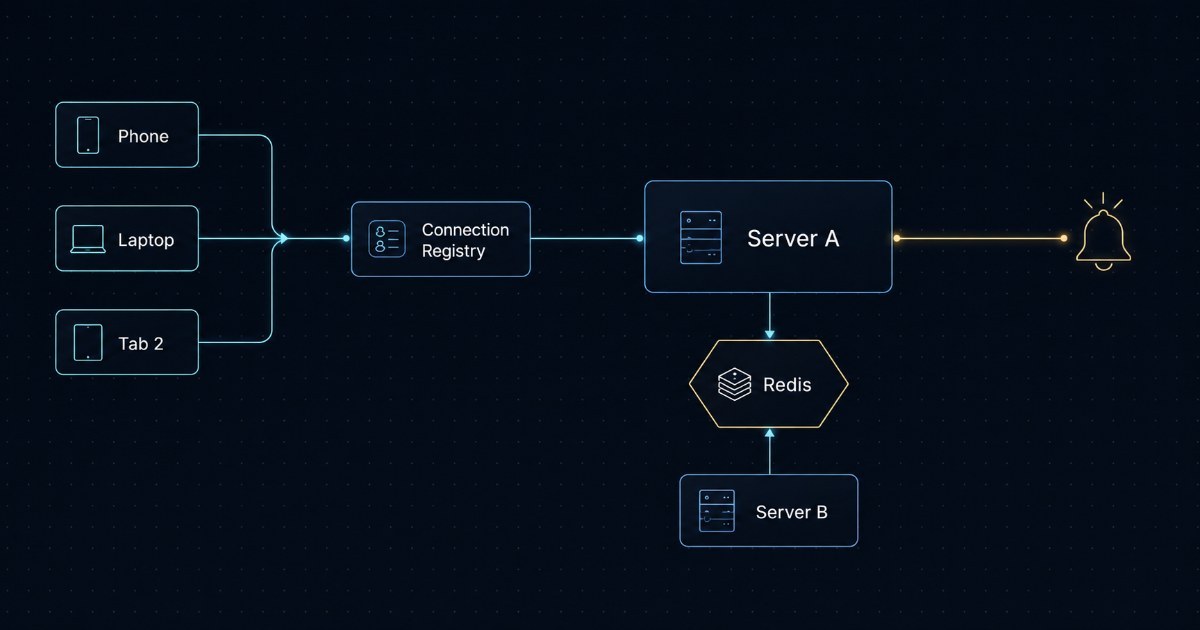
The easy version of "real-time notifications" assumes one user equals one connection. That assumption breaks the moment someone opens the app on their phone, keeps a laptop tab open at work, and opens a second laptop tab later to check something. That's the same person, but three separate, simultaneously-live connections that all need the same notification.
The registry that tracks this is a plain in-memory map, but structured in two layers - the outer map is keyed by user ID, and the inner map is keyed by a random ID generated per connection:
private final ConcurrentHashMap<String, ConcurrentHashMap<String, SseConnection>> connections = new ConcurrentHashMap<>();Every device or tab you have open gets its own entry in your personal inner map, and a notification gets pushed to every entry in it - genuinely fanning out to all of them, not just the most recent one. There's a real cap here too, 5 connections per user by default, enforced the moment a 6th tries to register:
if (userMap.size() >= sseProperties.getMaxConnectionsPerUser()) { evictOldest(userMap);}Hit the cap, and the oldest connection - not a random one, the actual longest-lived one, tracked by a real connectedAt timestamp - gets force-closed to make room. That's a deliberate choice: if you've got 5 tabs open and forgot about 4 of them, the one you're actually still using is the one that survives.
There's a second, separate ceiling above all of this - a hard cap on the entire system, not per user, defaulting to 2,000 live connections. Cross it, and a new connection attempt gets rejected cleanly with a "come back in 30 seconds" response, instead of the server quietly running out of memory holding open connections nobody's watching anymore.

A heartbeat that does two completely different jobs
Every 25 seconds, a scheduled job walks every currently-open connection and sends a small comment-only ping - invisible to the actual notification data, purely there so load balancers and reverse proxies (which love to kill anything that looks idle) don't disconnect a perfectly healthy connection for the crime of being quiet.
@Scheduled(fixedDelayString = "${app.notifications.sse.heartbeat-interval-ms:25000}")public void heartbeat() { ... for (SseConnection connection : userEntry.getValue().values()) { Instant exp = connection.getAccessTokenExpiresAt(); if (exp != null && now.toEpochMilli() + leeway >= exp.toEpochMilli()) { closeForReauth(connection); continue; } connection.getEmitter().send(SseEmitter.event().comment("hb")); }}But that same loop checks something else on every single pass: is this specific connection's login token about to expire? A live SSE connection can easily outlive the access token it was opened under - nobody's browser is going to close a background connection just because a token technically expired in the background. So the heartbeat doubles as an expiry monitor, and 30 seconds before a token would actually die, it proactively sends a "please reconnect" signal and closes the connection on its own terms, cleanly, instead of leaving you connected to a stream that's quietly running on a dead credential.
A live connection that outlives its own login token is a bug waiting to be discovered by whoever hits it first. Closing it early, on a clock you control, is a lot cheaper than debugging it after a user reports "notifications just stopped."
That same heartbeat loop is also the thing that catches connections the normal disconnect callbacks missed - if a send fails mid-heartbeat, it triggers the exact same cleanup path a real client disconnect would.

The part I'm most confident is actually right: keeping your login token out of the URL
This is the constraint that makes the whole thing harder than it sounds. Browsers open a live server-sent-events connection through a plain URL - there's no way to attach a custom Authorization header to it, because that's just how the underlying EventSource API works. Something has to sit in that URL to prove who you are.
The obvious shortcut is putting your actual login token there. The obvious problem with that shortcut: URLs get logged. By your own server, by any proxy in between, by your browser's own history. A login token sitting in a URL is a token that's now sitting in several places you don't fully control, for as long as those logs exist.
So the connection URL never carries the real token. It carries a disposable one instead:
public String issue(String userId, String jti, Instant accessTokenExp, String clientIp, String userAgent) { String ticket = UUID.randomUUID().toString(); SseTicketData data = SseTicketData.builder() .userId(userId) .jti(jti) .ipHash(sseProperties.isBindIp() ? sha256(clientIp) : null) .userAgentHash(sseProperties.isBindUserAgent() ? sha256(userAgent) : null) .build(); cacheService.put(key(ticket), data, Duration.ofSeconds(sseProperties.getTicketTtlSeconds())); return ticket;}To open a live connection, your browser first calls a real authenticated endpoint (with your real token, in a real header, the normal safe way) and gets back one random, single-use ticket. That ticket - not your login token - is what actually shows up in the SSE connection URL. It expires in 30 seconds if nobody uses it. And the moment it is used, this happens:
public Optional<SseTicketData> consume(String ticket, String clientIp, String userAgent) { Optional<SseTicketData> opt = cacheService.get(key(ticket), SseTicketData.class); if (opt.isEmpty()) return Optional.empty(); cacheService.delete(key(ticket)); // gone. can never be used again. ...}Deleted immediately, before anything else even gets checked. So even in the worst case - a ticket somehow leaking into a shared proxy log during its 30-second life - it's already worthless by the time anyone could try to reuse it. On top of that, the ticket optionally gets bound to a hash of the IP address and browser fingerprint that requested it, so even a same-second interception from a different network gets rejected.
If your connection ever drops and reconnects, there's a real recovery story too - the client can pass back the ID of the last notification it actually received, and the server looks up everything that happened after that ID and replays it, capped at 50 events, so a brief network blip doesn't mean silently missing something that happened while you were offline for a few seconds.

What happens when the connection and the event live on two different servers?
This is the part that only matters once you stop running on a single server, and it's also the part most naive real-time implementations quietly assume will never happen.
Say this ran on two backend instances behind a load balancer. Your live connection happened to land on server A. Meanwhile, someone likes your post, and the request that triggers that notification happens to land on server B - a completely different process, with zero shared memory with server A. Server B has no idea your connection even exists. It's sitting in a Java ConcurrentHashMap that lives entirely inside server A's memory.
The fix is that no server ever assumes it's the one holding your connection. Instead, every server publishes every notification to the same Redis channel, and every server is subscribed to that same channel, listening:
public void publish(String userId, String eventName, String eventId, Object payload) { SseFanoutMessage message = SseFanoutMessage.builder() .userId(userId) .eventName(eventName) .eventId(eventId) .payload(payload) .originNodeId(nodeId) .build(); redisTemplate.convertAndSend(sseProperties.getRedisChannel(), message);}@Overridepublic void onMessage(Message message, byte[] pattern) { SseFanoutMessage payload = deserialize(message.getBody()); registry.sendToUser(payload.getUserId(), payload.getEventName(), payload.getEventId(), payload.getPayload());}So server B publishes the notification without knowing or caring who's actually connected to whom. Server A, subscribed to the same channel, receives the message, checks its own local registry, finds your connection sitting right there, and delivers it. Redis is the only thing that has to know both servers exist - neither server has to know anything about the other.
The one thing I found that isn't actually finished
I said I'd point this out rather than pretend the writeup is spotless, so here it is: every fanout message carries a field called originNodeId - a random ID generated once per server when it starts up, meant to identify which server originally published a given message.
private final String nodeId = UUID.randomUUID().toString();As far as I can tell rereading this, nothing anywhere actually reads that field back out and does something with it. Every server that receives a fanout message processes it identically, including the server that published it in the first place. It's not wrong - a server publishing on behalf of a user still needs to deliver to that same user's connections if they happen to also be on the publishing server. But the field itself looks like the start of something I meant to come back to - maybe self-filtering, maybe debugging visibility into which node handled what - and never did.
It's a small, honest gap. I'd rather leave it visible than quietly remove it from the description and pretend the design was finished exactly as intended.
Why I'm writing this at all
None of this shows up in a demo. Nobody screenshots a connection registry. Nobody puts a heartbeat loop in a portfolio screenshot. The entire point of building it this way is that it becomes invisible - notifications just arrive, on every device, instantly, and nobody watching the product ever has to think about how.
This is exactly why I keep building Revquix the way I do - not to ship a product, but to force myself into the kind of problems that only show up once a system has real constraints: more than one device, more than one server, a login token that can't just sit in a URL. Tutorials don't make you hit any of that. Building something real, end to end, does.
I wrote this because I think that invisible work deserves to be visible sometimes, and because showing the actual reasoning - including the one part I didn't finish - is more useful to another engineer than telling you it's all figured out. If you're curious about the rest of the project, it's at https://www.revquix.com
If you want to see the rest of what I've built on Revquix, or connect / book a session directly, my profile card is embedded above.
Discussion